Table of Contents
Project/customer based configuration
Project and tasks
Creating projects and projects groups
Project creation can be accessed several ways:
- Menu » Configure and Manage » Edit tasks and projects
Properties of project
Project is process which has a goal, an estimated time and resources
- Period: the start and end date of the project, if set it will restrict all the dates under this project for the given period
- Target costs: the estimated costs of the whole project, if set it will restrict the total of the costs to be less or equal than this value
- Estimated time: time for the project, if set it will restrict the total of the costs to be less or equal than this value

Project memberships: types and inheritance
Project members: the members of a project will be able to create tasks and assign the task to themselves inside the project, even if their Manage task/project permission is set to Limited.
Project leaders: the leaders of a project will be able to to create tasks and assign the task to themselves and the project members inside the project, even if their Manage task/project permission is set to Limited. If their Request approval setting is Being project leader of Being both project leader and supervisor the can approve the Offline and Manual working time modifications of the project members. They are also able to use the Switch to Task Keyword based rules.
- Assign project members or leaders at creation (it also can be done later)

- Check the status of member assignment: the status can be changed or the membership deleted.

- See inheritance in a child project: the project membership can not be withdrawn at the subprojects.

Creating tasks under the projects
Task creation can be accessed several ways:
- Menu » Configure and Manage » Edit tasks and projects
- Resource Manager » New task
- My JobCTRL » Task assignments » New task
- From Client
Properties of task
Basic:

Advanced properties:
- IsPlanned: the task will not appear for the users in the desktop application, until this is set
- Duration of time task: this will create a task with a counter. When the user or a rule selects the task, it will start a timer with the given time. When the value is positive the timer starts from that value and count down to zero. When the value is negative the timer starts from zero and count to the given value. After the counting sequence is finished, the client application will go to inactive state.
- Task closes automatically after x day(s) of inactivity: if there is no worktime accounting for the task, it will be closed automatically.

Understanding of Task Assignments
When a task is created, it is not visible for the users in the desktop application until it is assigned to them. Main goal for the assignment is to make task selectable for the the user. The other importance of the assignment is to assign the resource availability to the task and project.

Understanding of Time, Cost and Deadline restrictions
Set properties for the project to make the restrictions (Period, Target costs and Estimated time can make restrictions):

New task will have the restrictions set:

Using Keyword based switch to task rules
Simple vs Complex rules
Simple rule: 
If defined we can switch to complex rule definition, which requires the function to be enabled from the backoffice of the server.

Complex rule:
Using task templates
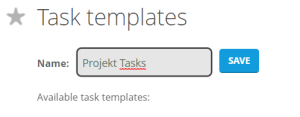
- Creating task template:

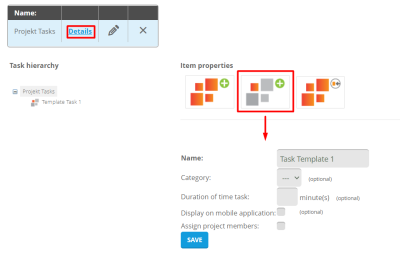
- Adding tasks to template:

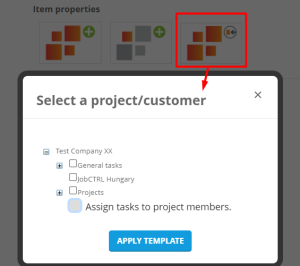
- Assigning to projects at definition:

- Assigning template to a project at the Project properties menu:

The members of the project can be assigned immediately to the tasks. After the right template is selected from the hierarchy on the left side of the page.

A pop up window will apear, where the assignments can be maden.

Creating Switching to project/customer rules
Concept: if the project can be identified, and the activity can determine the project task the whole process can be automatic
In the example we are going to separate the Word and the Notepad usage for a certain project, let us create the template:

Assign it to two projects. 
Create rules based on the title and activity for the projects
- Notepad rule (switch to Notepad usage):

- Word rule (switch to Word usage)

This will result the following, when the Notepad has the Template test 2 in the title:


Advanced level configuration: planning phases
Configuring phases
Phases can be useful when a project lasts for a longer period than the financial year or for other reasons the companies are using shorter terms for accounting with their customers.
- Phase configuration can be found at Set up your business » Company setting » Planning phases

Using phases at Budget Planning
When using phases at project plannig the restrictions are also valid inside the phases.
- When the planning phases are set the Project details will change:

Editting a Task details will also show the pre-set planning periods.
Reporting projects
Project report
- The project report reflects the Planning phases:
