
additional_resources:jc360_and_azuread_integration
This is an old revision of the document!
Table of Contents
Integrating Azure AD with JC360: Setup Guide
| To enable Azure Active Directory (Entra ID) authentication and user synchronization in your JC360 production environment, follow the configuration steps outlined below. |
|---|
How to Integrate Azure AD with JC360 for Production Environments
To enable secure and seamless login for your users through Microsoft Entra ID (formerly Azure Active Directory) in the JC360 production environment, follow the configuration steps below. This guide will walk you through creating an app registration, generating credentials, and setting permissions required for login and user synchronization.
Step 1: Register a New Application in Microsoft Entra ID
You’ll need to create an App Registration in your Azure portal. This app will act as the identity bridge between your Azure AD and JC360. (help: https://learn.microsoft.com/en-us/entra/identity-platform/quickstart-register-app)
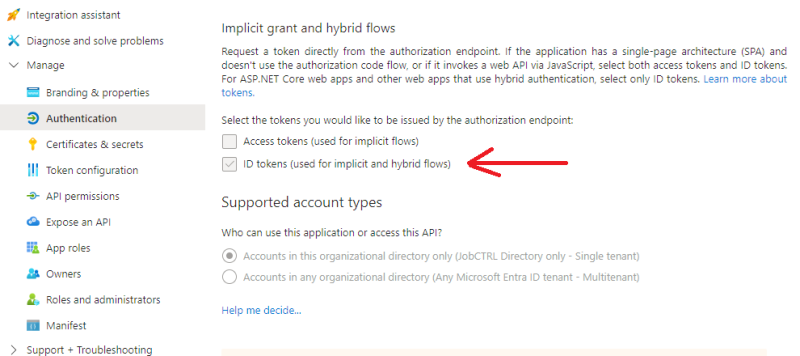
Step 2: Add the Redirect URI and enable the ID token
You must add a redirect URI to your app registration. This URI depends on your JC360 hosting type:
- Cloud-based environments (hosted by JC360): https:(br.)jobctrl.com/Login/AzureADAuthenticate.aspx * On-site (self-hosted) environments: https://jc360.[company-short-name].com/Login/AzureADAuthenticate.aspx (help: https://learn.microsoft.com/en-us/entra/identity-platform/how-to-add-redirect-uri) Once the URi assignment has been maden, one-time configuration is required to enable ID tokens by the authentication endpoints.
 ==== Step 3: Generate a Client Secret ====
In the app registration's “Certificates & secrets” section, generate a client secret. Save this value securely—you'll need to share it with JC360 Support. (help: https://learn.microsoft.com/en-us/entra/identity-platform/how-to-add-credentials?tabs=client-secret)
==== Step 4: Send Required Information to JC360 Support ====
Please send the following values to JC360 Support Team via email (support@jobctrl.com):
* Application (Client) ID
* Tenant ID
* Client Secret
* User Principal Name (UPN) of the person performing the initial login test
These credentials allow us to configure Azure AD authentication and allow access to your domain.
==== Step 5: Assign Microsoft Graph Permissions ====
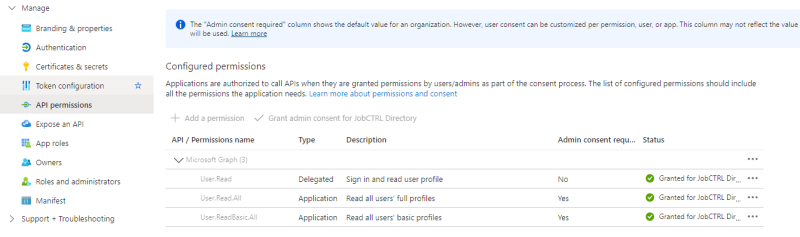
To enable automatic user synchronization, configure Microsoft Graph API permissions for your app:
- Add Application permissions to read user profiles.
- Grant Admin consent after assigning permissions.
==== Step 3: Generate a Client Secret ====
In the app registration's “Certificates & secrets” section, generate a client secret. Save this value securely—you'll need to share it with JC360 Support. (help: https://learn.microsoft.com/en-us/entra/identity-platform/how-to-add-credentials?tabs=client-secret)
==== Step 4: Send Required Information to JC360 Support ====
Please send the following values to JC360 Support Team via email (support@jobctrl.com):
* Application (Client) ID
* Tenant ID
* Client Secret
* User Principal Name (UPN) of the person performing the initial login test
These credentials allow us to configure Azure AD authentication and allow access to your domain.
==== Step 5: Assign Microsoft Graph Permissions ====
To enable automatic user synchronization, configure Microsoft Graph API permissions for your app:
- Add Application permissions to read user profiles.
- Grant Admin consent after assigning permissions.
 (help: https://learn.microsoft.com/en-us/entra/identity-platform/quickstart-configure-app-access-web-apis#application-permission-to-microsoft-graph , https://learn.microsoft.com/en-us/entra/identity-platform/quickstart-configure-app-access-web-apis#admin-consent-button)


additional_resources/jc360_and_azuread_integration.1750085952.txt.gz · Last modified: 2025/06/16 14:59 by support