
This is an old revision of the document!
Audit Report
| The Audit Report shows all changes made on the website in chronological order, providing administrators with a complete audit trail of user activities, configuration changes and system events. |
|---|
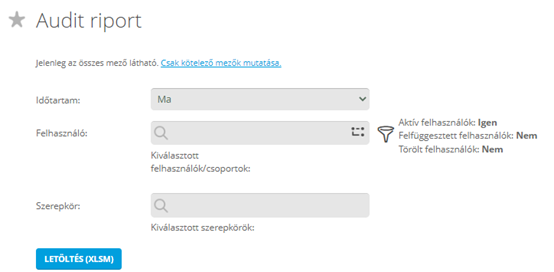
By clicking on the image you can open the Audit Report page or by using this link. (You need to login to your JC360 account.)
Before downloading the report you can specify the reporting period, users, user groups or roles.
About the report
The Audit Report displays all important events recorded by the JC360 system in chronological order. It enables administrators to review user activities, configuration changes, security-related events and server events for auditing, troubleshooting and compliance purposes.
The tables always contain the ID and name of the user performing the action and, in most cases, the IP address of the device used to perform the action.
Report contents
The Audit Report contains the following worksheets:
- User Logins
- Page Visited
- Forgot Password Changed
- User History
- User Group History
- Client Downloaded
- Audio File Downloaded
- Other File Downloaded
- User Created
- Task Created
- Task Assignment Created
- Rule Created
- Productivity Created
- Group-Supervisor Assignments
- System Settings History
- User-Role Assignments
- Server Component Restarts
- Server Job Events
- Company Aggregated KPIs History
Availability
The Audit Report is available in several formats:
- via the website in XLSX format
- via the REST API in JSON format
- via the Report Downloader Tool in CSV format
SIEM integration
The Audit Report data can be integrated with any SIEM system.
Integration can be performed using:
- JSON data provided by the REST API
- XLSX export
- CSV export
- HTML e-mail alert notifications (where applicable)
Access to audit report data
Via REST API
The Audit Report can be retrieved using the following REST API function:
https://jobctrl.com/api/restapi/GetCustomReport
The API returns the report in JSON format.

The JSON contains the following elements:
- Columns – names of the columns in the worksheet
- Rows – row data
- TableName – worksheet name
The Hide and Delete switches are only used during XLS generation and have no effect on JSON export.
Via WEB
The Audit Report is available from:
https://jobctrl.com/UserCenter/Reports/UserAuditReport.aspx
Available filters:
- Duration
- User
- User Role
This method downloads the report in XLSX format.


Via Report Downloader Tool
The Report Downloader Tool allows automatic downloading of the Audit Report in CSV format.
Configuration parameters:
- Auth code
- JC API Address
- JC REST API Address
- Service name

Additional configuration options:
- Job name
- Output path
- Sheet name
- User IDs
- User Group IDs
- Report interval

After configuration click Save and then Restart service. The report will automatically be downloaded according to the configured schedule.
Audit Report as a security alert
The Audit Report can also be used as a security alert mechanism.
Instead of displaying an entire reporting period, it can be configured to send HTML e-mail notifications every hour whenever important configuration changes are detected, including:
- System settings
- External file downloads
- Productivity settings
- Visibility changes
In this mode only the changes since the previous execution are included in the report.
This functionality is currently available upon request through the JC360 team.
Audit log entries cannot be deleted through the JC360 application.
Audit log data can only be removed by direct database access. The application does not provide functionality to delete audit log files or individual audit log entries.
Sample HTML e-mail:
